
RAG: How it works and when to use it
How an application finds relevant information and provides it to a model before it answers.
On this page
This is Part 1 of our four-part series of articles on RAG.
A large language model (LLM) can explain how software generally works. But if you ask it how to use your company's product, where does it get the answer? To get the right answer, it needs the product's documentation, including details that may have changed since the model was trained.
Retrieval-augmented generation, or RAG, gives an application a way to find relevant information and provide it to a model before it answers. This lets us build assistants whose answers draw on a particular collection of documents, rather than relying on what the model learned during training.
If you're asked to design a documentation assistant in an interview, saying “I'd use RAG” is only the beginning. You'll need to explain how the documents become searchable, how the application finds useful information, and what the model actually receives.
We'll work through those decisions by building a documentation assistant. The goal is to understand what happens when an LLM is given a question, how it adds relevant information, and how it arrives at an answer using that relevant information.
Answering questions about our product
Imagine your team maintains a project-management product. Its help site contains pages explaining how to create projects, manage access, change billing details and recover deleted work.
Users can already search that site and read the instructions themselves. Your task is to let them ask a question and receive an answer based on those instructions.
Someone asks:
I accidentally deleted a project. How can I get it back?
Your application sends the question to an LLM. But the request contains nothing about your product's recovery process. How would the model know which menu to use, who can restore a project, or how long recovery remains possible?
These aren't details we want it to guess. Our help site has a specific policy. For this fictional product, it reads:
Restoring deleted projects
Deleted projects remain in Trash for 30 days. A workspace admin can restore a project by opening Settings → Trash, selecting the project, and choosing Restore. After 30 days, the project is permanently deleted.
The answer needs to follow those instructions. It shouldn't describe how a different product handles deleted work or assume there's a recovery option after the deadline.
So let's give the model access to the documentation when we ask it to answer.
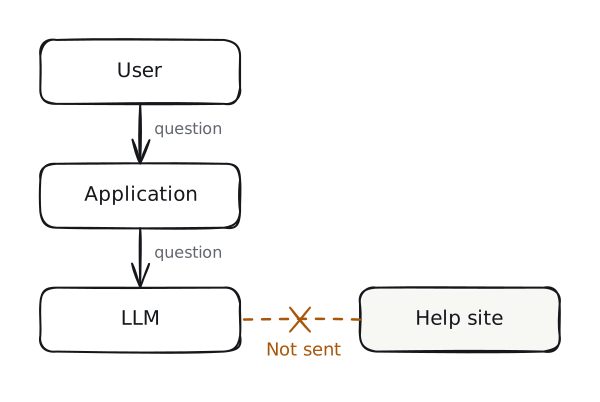
Send the documentation with the question
We can start by reading the text from our help pages and including it in every request. The application sends three things:
- Instructions to answer from the documentation.
- The user's question.
- The documentation itself.
Here's the shape of that request. The brackets stand for document text inserted by our application:
Answer the question using the product documentation below.
If the documentation doesn't answer it, say so.

Question:
I accidentally deleted a project. How can I get it back?

Documentation:
[Text from the project-management pages, including recovery instructions]
[Text from the billing pages]
[Text from the account and integration pages]
[Text from the remaining help pages]
Now the recovery policy is in the input. The model can use it to explain the 30-day limit and the steps an admin should take. We haven't trained the model again; we've supplied information for this request.
For a small help site, this may be enough. But our product has hundreds of pages. Sending all of them with every question can make answers slower while costing us more. Even if the text fits, the model may overlook the recovery instructions among all the other pages and give an incorrect answer.
A model also has a hard limit on how much text it can work with in one request. This is its context window, measured in tokens, which are pieces of text. We need room for our instructions, the question, the documents, and the answer.
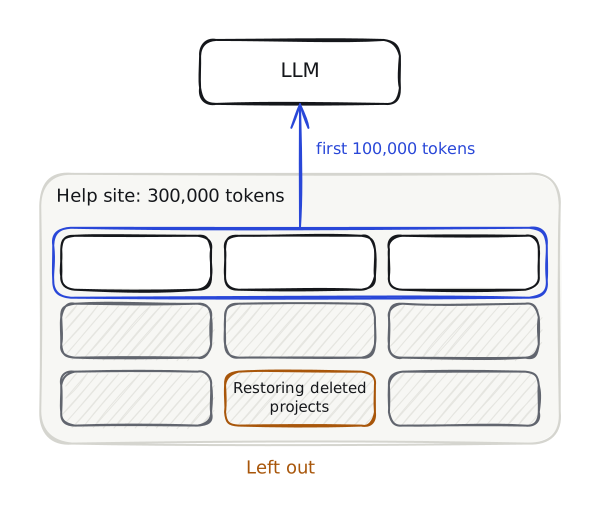
To make the problem concrete, we'll give our example request room for 100,000 tokens of documentation. The library contains 300,000. (These are example numbers, not the limits of a particular model.) Thus, our whole library cannot fit in this request.
Taking the first 100,000 tokens doesn't solve it. The recovery instructions might be in the part we leave out. And our recovery question doesn't need the billing pages or any other unrelated pages, even if those happen to come first.
What we want is a way to find the recovery instructions before sending the request. For a billing question, that same process should find the billing instructions instead.
That is the job of retrieval, the R in RAG: search the documents for material relevant to the question. We can then include that material in the prompt instead of including every page.
Choose what search should return
So far, we've looked only at the Restoring deleted projects paragraph. On our example help site, that paragraph is part of a help page called “Managing projects.” In our RAG system, that help page is one source document: the complete item the application reads before splitting it into searchable pieces.
For this example, the source document is stored as Markdown, a plain-text format that uses markers to identify things like headings and lists. In the Markdown file, # marks the document title and ## marks each section heading:
# Managing projects

## Creating projects
Open Projects and select New project.

## Archiving projects
Archived projects are hidden from the active project list.
Open Projects → Archived to view them.

## Restoring deleted projects
Deleted projects remain in Trash for 30 days. A workspace admin can restore
a project by opening Settings → Trash, selecting the project, and choosing
Restore. After 30 days, the project is permanently deleted.
Our user asked about recovering a deleted project. If search returns this whole source document, we'll also send the creating and archiving instructions to the model. How can we make the recovery section searchable on its own?
To do that, we divide the source document into smaller pieces called chunks. Each chunk becomes something we can search for and retrieve separately. This preparation step is called chunking.
The important decision is where each chunk starts and ends. A cut in the wrong place can separate an instruction from a condition the user needs to follow.
Start with a fixed size
One straightforward approach is to count characters and start a new chunk whenever we reach a chosen limit. Characters include letters, spaces, and punctuation. For example, with a limit of 500 characters, we take the first 500, then the next 500, and continue until we reach the end.
This is size-based chunking. We can also measure the size in tokens instead of characters.
A splitter that only counts characters doesn't know whether it has reached the end of an instruction. Suppose one of its cuts lands here:
End of one chunk:
Deleted projects remain in Trash for 30 days. A workspace admin can restore
a project by

Start of the next chunk:
opening Settings → Trash, selecting the project, and choosing Restore.
After 30 days, the project is permanently deleted.
The second chunk contains the recovery steps, but the admin requirement is in the first. If search returns only the second chunk, the model won't have the information explaining who can perform those steps.
We can reduce this problem with overlap: repeat some text from the end of one chunk at the beginning of the next. With 500-character chunks and 100 characters of overlap, the second chunk starts 100 characters before the first one ends.
That gives each chunk some surrounding text. But it doesn't guarantee that the missing condition is included. A requirement farther back in the source document could still fall outside the overlap.
Keep sentences together
Instead of cutting at an exact character count, we can split the source document into sentences and group several sentences into each chunk. This is sentence-based chunking.
Our admin requirement and recovery steps belong to the same sentence. Keeping that sentence intact prevents the particular split above.
But a complete sentence isn't always a complete explanation. The recovery deadline is in a separate sentence. A chunk containing only the menu instructions could still leave out the 30-day limit.
Use the source document's headings
Here are the sections from the “Managing projects” source document again:
| Markdown heading | Content |
|---|---|
## Creating projects | Open Projects and select New project. |
## Archiving projects | Archived projects are hidden from the active project list. Open Projects → Archived to view them. |
## Restoring deleted projects | Deleted projects remain in Trash for 30 days. A workspace admin can restore a project by opening Settings → Trash, selecting the project, and choosing Restore. After 30 days, the project is permanently deleted. |
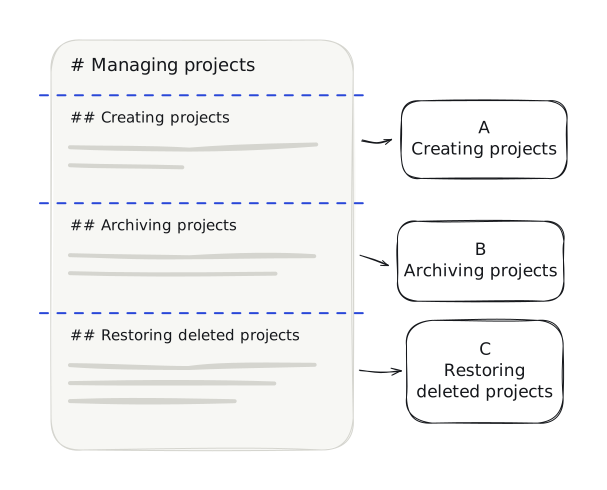
Those ## markers give our application a specific place to split. A marker used to separate pieces of text is called a delimiter. For this file, our delimiter is a line starting with two hash signs followed by a space.
The application reads the file line by line. When it reaches ## Creating projects, it starts the first chunk, keeping the heading and the text below it. When it reaches ## Archiving projects, it finishes the first chunk and starts the second. It does the same at ## Restoring deleted projects, then keeps the remaining text through the end of the file.
The single # in # Managing projects marks the document title, so it doesn't match our section delimiter. We keep the title as source information rather than making it a separate chunk. This file has no introductory text between its title and first section.
This is structure-based chunking: choosing cuts from the source document's headings or other structural boundaries instead of a character count. Our three section markers produce three chunks:
| Chunk | What it contains |
|---|---|
| A | “Creating projects” and its instructions |
| B | “Archiving projects” and its instructions |
| C | “Restoring deleted projects” and the entire recovery paragraph |
We now have three searchable chunks from one source document.
We'll use this approach for our example because we know how the Markdown file is organised and its sections are short. A much longer section would still need smaller chunks. If the source document were stored as HTML instead, we would identify its heading elements, such as <h2>, rather than look for Markdown markers. Plain text or text extracted from a PDF may not preserve clear headings, so this splitting rule wouldn't reliably find its sections.
There are also methods that look for changes in subject to decide where to split, often called semantic chunking. We'll examine those and the other strategies in the second article.
Match a question to a chunk
We now have three chunks. How do we find the one that answers the user's question?
A keyword search could look for “deleted” and “project,” both of which appear in the recovery paragraph. That's a reasonable starting point. But users won't always use the terms our documentation uses. They might say “get it back” where we say “restore.”
The way to solve this dilemma is to compare text using what is known as embeddings. An embedding is a list of numbers that represents information about the meaning of some text. You may also see it called a vector. By comparing the lists, we can find related text even when the wording differs.
But where do those numbers come from?
We pass each chunk’s heading and text to an embedding model. This is a machine-learning model trained to turn text into numerical representations. Unlike the LLM that will write our answer, its job here is to produce numbers we can use for search. We give this model each chunk's heading and text and store the embedding it returns alongside the original text. When the user asks their question, we create an embedding for that question too. We then compare it with the stored chunk embeddings to find likely matches.
Searching this way is called semantic search: finding text by its meaning, rather than only by shared words. A close match helps us choose a chunk; we still need to check whether that chunk contains the information needed to answer.
For our question, we want “get it back” to match the instructions for restoring a project. The model has to capture more than the shared word “project,” since the creating and archiving chunks contain that word too.
Let's make that comparison visible. We'll use made-up two-number vectors so the example is small enough to follow. Real embeddings generally have many more numbers; these values are an illustration, not model output.
Suppose our embedding model returns just two numbers for each input. We send it the heading and full text of chunk A, and imagine it returns [0.00, 1.00]. We do the same for B and C, then for the user’s question. The values below are made up to demonstrate the comparison, not results from a model we ran. Real embedding models usually return much longer lists. We’re using two numbers so we can plot each embedding on a graph and see how the comparison works.
| Text | Example embedding |
|---|---|
| A: Creating projects | [0.00, 1.00] |
| B: Archiving projects | [0.60, 0.80] |
| C: Restoring deleted projects | [1.00, 0.00] |
Store the chunks and their embeddings
We need to save these embeddings so we can search them when a question arrives. To store them, we'll use a vector database, a database that stores vectors and lets us search for similar ones.
We add one record for each chunk. It contains the chunk's ID, its heading and original text, its embedding, and source information pointing to the original help page and section. C's record looks like this:
Chunk ID: C
Heading: Restoring deleted projects
Text: Deleted projects remain in Trash for 30 days. A workspace admin can
      restore a project by opening Settings → Trash, selecting the project,
      and choosing Restore. After 30 days, the project is permanently deleted.
Source information: Managing projects → Restoring deleted projects
Embedding: [1.00, 0.00]
The embedding lets us compare C with a question. The original text supplies the instructions we'll send to the answering model. The source information tells us where those instructions came from, so we can link the answer back to the help page.
We store A and B in the same way, before users ask questions. The database now holds three searchable records. We don't need to recreate them each time someone asks about a deleted project.
With only three chunks, we could keep the records in a list and calculate the similarities ourselves. For the full help site, the database keeps the records and handles searches across the collection. This can be a database with vector-search support or a dedicated vector database; the important capability is searching the stored embeddings and returning their associated text.
Search when a question arrives
The user asks:
I accidentally deleted a project. How can I get it back?
Our application sends the question to the embedding model. We use the same embedding model for the chunks and the question, following its instructions for each input type, so the numbers can be meaningfully compared. Embeddings from unrelated models may represent text differently, even if their lists contain the same number of values.
For our example, let's assume that the embedding we get back is [0.96, 0.28].
The application sends this question embedding to the vector database and asks for one matching record, including its text and source information. For our three records, the database can compare the question with each stored embedding. Here's how that comparison works.
Each pair gives us a position on the graph: the first number is the horizontal coordinate, and the second is the vertical coordinate. For example, C's [1.00, 0.00] places it one unit to the right of (0, 0). The question's [0.96, 0.28] places it slightly to the left and above C. These coordinates don't have assigned meanings such as “project” or “recovery.” In a real model, training determines how text is represented by the numbers. Here, we've chosen values that make the question match the recovery chunk more closely than the other two chunks.
With two numbers, we can plot each embedding on a graph and draw an arrow from the origin, the point (0, 0), to it. The question's arrow points almost in the same direction as C's. B points farther away, and A farther still.
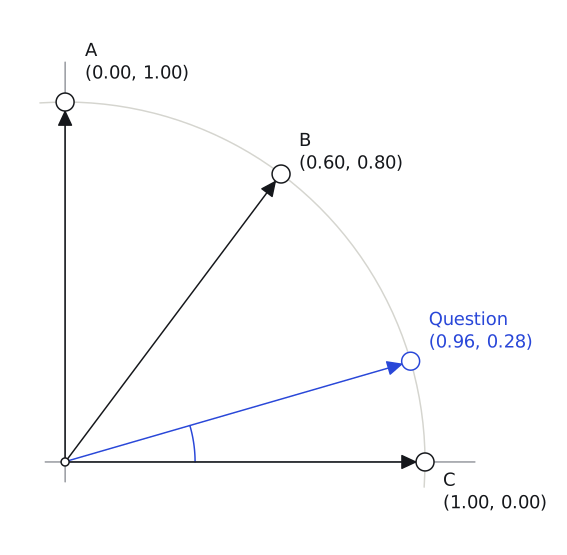
Cosine similarity measures this difference in direction. Arrows pointing in the same direction have a similarity of 1. Our example arrows all have a length of one on the graph, which makes the calculation simple: multiply matching entries and add them. For the recovery chunk:
Question compared with C:
(0.96 × 1.00) + (0.28 × 0.00) = 0.96
Doing the same for the other two gives us:
| Chunk | Similarity to the question |
|---|---|
| C: Restoring deleted projects | 0.96 |
| B: Archiving projects | 0.80 |
| A: Creating projects | 0.28 |
C has the highest similarity score, so our search returns it as the best match, including the recovery text and its source information.
Comparing every stored vector is practical for our three chunks. For a much larger collection, a database can use a vector index, a search structure that helps it find similar vectors efficiently. Some indexes narrow the search to likely matches instead of comparing every vector. This is called approximate search: it can reduce the search work, but may miss the closest match. Our example compares all three vectors directly.
Build the answer from the retrieved text
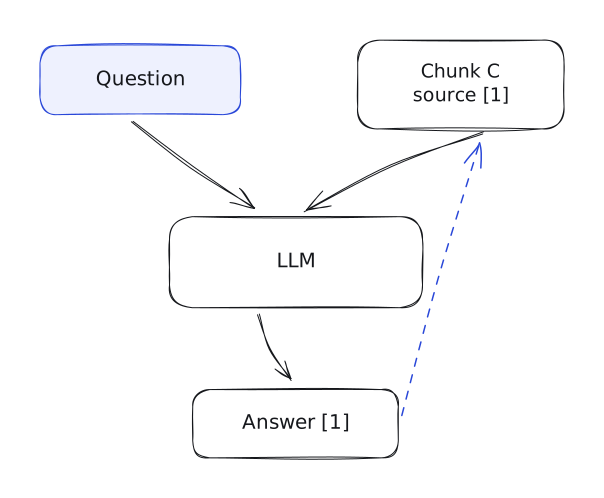
We can now replace the full documentation library in our original request with the recovery paragraph found by search.
The application reads C's text, gives it a source label, and assembles this request:
Answer the question using the supplied documentation.
Include any requirements or time limits that affect the answer.
Refer to the supplied source label. If the text doesn't answer the question,
say so.

Question:
I accidentally deleted a project. How can I get it back?

Source [1]: Restoring deleted projects
Deleted projects remain in Trash for 30 days. A workspace admin can restore
a project by opening Settings → Trash, selecting the project, and choosing
Restore. After 30 days, the project is permanently deleted.
Adding the recovery paragraph to the user’s question is augmentation, the A in RAG. The model now has the user’s question and the product information needed to answer it.
Our request now contains the user's question and the recovery paragraph found by search. The next step is generation, the G in RAG. This is when the LLM uses the supplied information to produce an answer. Here is an example of the answer we want:
If the project was deleted within the last 30 days, a workspace admin can open Settings → Trash, select the project, and choose Restore. After 30 days, the project is permanently deleted. [1]
We can check each part against the retrieved chunk: the time limit, the admin requirement, and the menu steps are all there. We can't say whether this user's project is still recoverable because they haven't told us when it was deleted.
Follow the complete request
Let's go back to where we started. A user asks how to recover a deleted project. Our application now has a way to answer without sending every help page or relying on the model to know the recovery policy already.
There are two flows.
Before a question, we prepare the documentation:
- Read each source document.
- Split it into chunks, keeping the recovery conditions together.
- Create an embedding for each chunk.
- Store the embeddings with the chunk text and source information.
When a question arrives, we use that prepared material:
- Create an embedding for the question.
- Search the stored embeddings and obtain the matching chunk records.
- Read their text and source information.
- Send that text to the answering model with the original question and instructions.
- Return the answer with its source references.
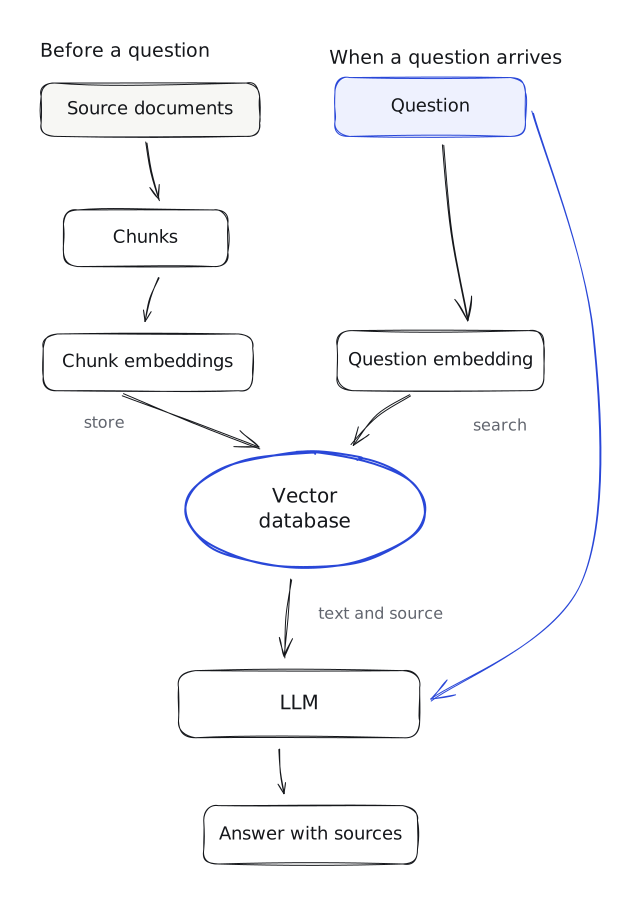
We create the chunks, embeddings and searchable records before any questions arrive. Ten people asking about project recovery don't require us to embed the same documentation ten times. Their questions use the prepared records. Changes to the source documents require those records to be updated.
That's what RAG adds to this application. Retrieval finds source material. Augmentation adds it to the input. Generation produces the answer from that input.
In an interview, you won’t have results from both approaches, so state your assumptions. Ask how large the documentation is and whether it fits in the model’s context window. If the collection is small, sending it with each question may be enough. If it is too large, or makes responses slow, expensive, or less accurate, use retrieval to select the relevant chunks. Explain the extra work retrieval introduces: splitting source documents, creating embeddings, storing them, and searching them for each question. Your interviewer should be able to see exactly why you added each of those parts.
Our example uses public help pages. If the source documents are private, the design also needs access checks before any restricted text reaches the model.
Check what happens when the answer is wrong
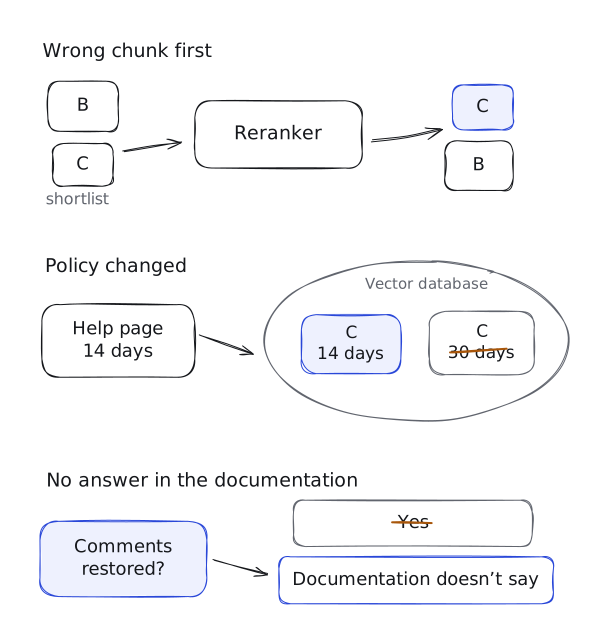
In our example, search found the recovery instructions, and the model used them to explain how to restore the project. But what happens if search finds the wrong instructions, the policy changes, or the documentation doesn't answer the question? Let's look at each situation.
What if search returns the wrong instructions?
Suppose a user asks how to recover a deleted project and our search ranks the archiving chunk first and the recovery chunk second. Our application takes only the first result, so the recovery instructions never reach the model.
How can we improve this?
Instead of immediately choosing the first chunk, we can retrieve several possible matches and compare them more carefully. A reranker is a model trained to make this comparison. We give it the question and each chunk's text, and it orders the chunks by how relevant they are to the question. This adds processing time, so we apply it to a shortlist of chunks rather than every chunk in the library.
For our example, the reranker would compare:
- The recovery question with the archiving instructions.
- The same question with the recovery instructions.
This gives us another opportunity to select the recovery instructions before sending text to the answering model. The reranker compares the question with both chunks, which can help it distinguish instructions for restoring a deleted project from instructions for viewing an archived one.
However, the recovery chunk must be in that shortlist. If the initial search never retrieves it, the reranker cannot select it.
What if the recovery policy changes?
Suppose the product changes its recovery period from 30 days to 14 days. We update the help page. The next day, a user asks about recovery, and our assistant still says they have 30 days.
Why?
Our search system uses the chunks we prepared and stored earlier. Editing the help page doesn't automatically update those stored chunks. If we haven't processed the change, chunk C still contains the old 30-day policy.
We need to repeat the preparation steps for the changed text:
- Read the updated recovery section from the help page.
- Create a new embedding from that updated text.
- Replace C's stored paragraph and embedding with the new versions.
Replacing the old record matters. Adding a second record while leaving the first searchable could let search return the outdated policy again. Document updates need to trigger this preparation process, or a scheduled job needs to pick them up.
Once we replace C, future searches can retrieve the updated paragraph. The model will receive the 14-day policy instead of the old 30-day policy. Updating the help page alone wasn't enough; we also needed to update the copy our assistant searches.
What if the documentation has no answer?
The user asks:
Does restoring a deleted project also restore its comments?
Our recovery paragraph says nothing about comments. Suppose the assistant nevertheless answers:
Yes, restoring the project will restore its comments too.
Where did that promise come from? It isn't in the text we supplied.
Our prompt already tells the model to say when the documentation doesn't answer a question. For this question, that means acknowledging the missing information:
The documentation doesn't say whether restoring a project also restores its comments.
If the model keeps guessing, we can make the instruction clearer by including an example in the prompt: a question, a chunk that doesn't contain its answer, and a response acknowledging the missing information. This shows the model how to handle the gap instead of filling it with an unsupported claim. It can help the model follow the instruction, but it doesn't guarantee that every answer will be supported.
To answer the comments question substantively, we need verified documentation about that behaviour. Until we have it, the assistant should leave the question unanswered rather than make a promise about the product.
Conclusion
RAG starts with a simple idea: find the information needed to answer a question and give it to the LLM as part of the prompt. This allows the model to use information beyond what it learned during training, without including the entire document collection in every request.
For us to include the right information in the request, we split the source documents into chunks, keeping related instructions and conditions together. We then create an embedding for each chunk and store it alongside the original text. When a question arrives, we use its embedding to find related chunks and include their text in the model’s prompt.
But search can find the right chunk and still return an old version. When a source document changes, we need to update its stored chunks and embeddings so future answers use the revised information. If the chunks don’t answer the question at all, the model should say what information is missing instead of guessing.
In an interview, explain why retrieval is needed and how information moves through these steps. That gives you a basis for discussing the design choices, rather than simply glossing over how the system works.
In the next article, we’ll look more closely at how to find useful chunks, including chunking, combining search methods, and reranking.
Was this article useful?
Test your understanding
Question 1 of 15
Single answer
Loading comments…