
RAG Retrieval: Finding the Right Information
Retrieval decides which information the LLM receives before it answers.
On this page
This is Part 2 of our four-part series of articles on RAG.
One of the most important parts of RAG is retrieval. This is the step that decides which information the LLM receives before it answers.
From the outside, retrieval looks deceptively simple. Most explanations describe it in four steps:
- Split the documents into chunks.
- Create an embedding for each chunk.
- Store the chunks and embeddings.
- When a question arrives, return the chunks most closely related to it.
In many RAG systems, vector search handles steps 3 and 4. A vector store keeps each chunk with its embedding and, when a question arrives, retrieves the chunks whose embeddings are closest to the question's embedding.
But many of the important retrieval decisions happen outside the vector search itself. The vector store does not decide where one chunk should begin or end. It doesn't know that an identifier such as PAY-042 may need to match exactly rather than semantically. It also does not know that answering a question may require evidence from several chunks or even multiple documents.
Those are system design decisions. You may need to choose an appropriate chunking strategy, combine semantic search with keyword or exact-match retrieval, apply metadata filters, retrieve more candidates and rerank them, or gather related information from multiple sources before sending context to the model.
This is why, in an AI system design interview, saying “we’ll store embeddings in a vector database” is not enough. It only restates the basic retrieval pipeline. You should be able to explain what you would store, how you would retrieve it, how you would handle the weaknesses of your retrieval method, and why that approach fits the documents and questions in front of you.
In this deep dive, we’ll work through those decisions by building the retrieval system for a payment-support assistant.
The information we need to find
Imagine an engineer has just rotated the API key for a payment provider. Checkout begins failing, and they ask the LLM attached to the help docs:
Checkout started showing PAY-042 after I changed the gateway key. How do I get payments working again?
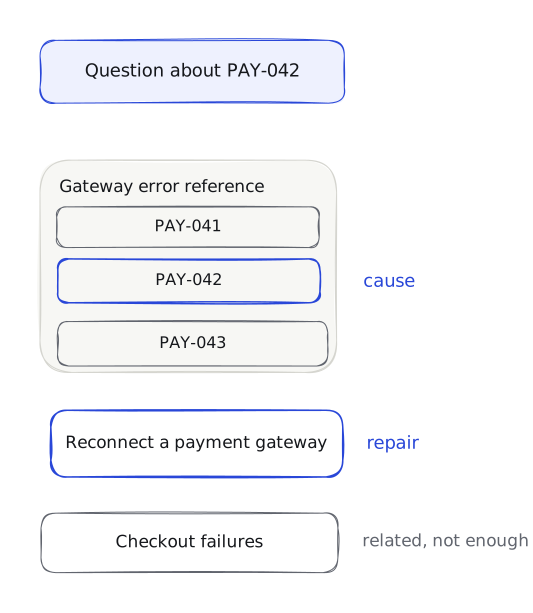
Before choosing a search method, let's look at the three help pages the assistant can use.
The first help page is a shared error reference. It is available to the support and payments-operations teams:
# Gateway error reference

## PAY-041: Provider request timed out

The payment provider did not respond before the request deadline. Check the provider status and retry policy before changing credentials.

## PAY-042: Stored credential was rejected

Checkout returns PAY-042 when the provider rejects the credential saved for the active gateway connection. This can happen after the provider key has been rotated but the new value has not been saved in the product.

## PAY-043: Currency is not enabled

The active gateway account does not accept the checkout currency.
The PAY-042 section explains what happened. The provider is rejecting the credential stored by the product, which can happen when a new key has not been saved after a rotation.
But it does not tell the engineer how to repair the connection. The second help page is an internal runbook that only the payments-operations team can read:
# Reconnect a payment gateway

If a provider API key is rotated, a workspace admin must open Settings > Payments > Gateways, select the active gateway, replace the stored credential, and choose Verify connection. Do not disable the gateway first; disabling it
stops new checkouts while the connection is being repaired.
The third help page is a general troubleshooting guide. It is shared with the same teams as the error reference:
# Checkout failures

Checkout can fail because a gateway is unavailable, a credential is rejected, or a currency is disabled. Record the error code before changing the payment configuration.
This last help page is related to the question, but it does not explain PAY-042 or how to reconnect the gateway. A useful retrieval result needs the PAY-042 explanation and the reconnection steps. Returning only the general troubleshooting page is not enough.
In our RAG system, each help page is one source document: the complete item from which the retrieval system creates searchable chunks.
So the question we need to answer is: How do we make these source documents searchable in a way that finds both pieces of information?
Choosing what search can return
In Part 1, we introduced chunking and showed how a bad boundary can separate an instruction from an important condition. Now, we want to take a closer look at how those boundaries are chosen.
The piece of content that the retrieval system searches for and can return as a result is called a retrieval unit. A retrieval unit might be an entire source document or a smaller piece taken from one. When we process a source document, we therefore create one or more retrieval units from it.
For simplicity, throughout this article we will call each retrieval unit a chunk, even when that chunk happens to contain the entire source document.
This means that not every source document needs to be split. The reconnection document is short and covers one procedure. The general checkout document is also short and covers one subject. Each therefore forms a single chunk.
The longer error reference needs different treatment. It contains three separate errors:
PAY-041, which explains a timeoutPAY-042, which explains a rejected credentialPAY-043, which explains a disabled currency
Keeping the entire reference as one chunk would place all three errors in the same retrieval unit. A search for PAY-042 would then return the explanations for PAY-041 and PAY-043 as well. The returned chunk would contain relevant information, but it would also contain text about two different problems. That may seem minor in this example, but a real error reference could contain hundreds of codes. Returning the whole document would send the model far more text than it needs.
We therefore need to split the error reference into smaller chunks. The next question is where to make the cuts.
Fixed-size chunking
With fixed-size chunking, we divide a source document after a set amount of text. A fixed-size splitter can count characters or tokens. We'll use tokens for this example.
Suppose the error-reference document contains 220 tokens and we choose a chunk size of 80 tokens. This produces:
| Chunk | Token positions |
|---|---|
| W1 | 0–79 |
| W2 | 80–159 |
| W3 | 160–219 |
The first chunk, W1, contains tokens 0 through 79 and ends at token 79, regardless of where it has reached in the source document. The next 80 tokens become W2, and the remaining 60 tokens become W3. The fixed-size splitting process (which we'll term the chunker from now on) does not check whether token 79 is at the end of an error entry or in the middle of its explanation. It makes the cut because it has reached the size we chose. For example, if the PAY-042 heading appears near the end of W1 and its explanation continues into W2, neither chunk contains the complete entry.
We could increase the chunk size from 80 to 120 tokens. That might keep the PAY-042 entry together, but the next cut could still separate another error from its explanation. The chunker is counting tokens, not following the sections in the document.
This does not mean fixed-size chunking is useless. Despite its drawbacks, fixed-size chunking is a useful fallback when the source documents we are working with do not have reliable headings or sections. When using fixed-size chunking, the chunk size must be chosen carefully. Here are three things to keep in mind:
- Smaller chunks contain less unrelated text, but they can separate information that belongs together.
- Larger chunks preserve more surrounding context, but each chunk may cover several subjects.
- Smaller chunks also create more records to embed, store and search.
What overlap actually does
To deal with the drawback of fixed-sized chunking, we can add overlap, which means repeating the end of one chunk at the beginning of the next. This helps preserve context when a cut falls in the middle of an explanation.
Suppose we keep the 80-token chunk size and add 20 tokens of overlap. The next chunk begins 60 tokens after the previous one:
stride = chunk size - overlap
stride = 80 - 20
stride = 60 tokens
Note: Stride is the distance between the starting positions of two chunks.
Our windows now look like this:
| Chunk | Token positions |
|---|---|
| W1 | 0–79 |
| W2 | 60–139 |
| W3 | 120–199 |
| W4 | 180–219 |
Tokens 60–79 appear in W1 and W2. The next set of tokens, 120–139 appear in W2 and W3. Finally, tokens 180–199 appear in W3 and W4.
Our error-reference document still contains 220 tokens, but the four chunks contain 280 token positions between them. We now have 60 duplicated positions to embed and store.
That duplication that has been introduced can help when the text we are concerned about is divided because a chunk ends. If the missing text falls within the repeated 20 tokens, both sides of the cut retain some surrounding context.
But overlap does not determine which pieces of information belong together. If the PAY-042 heading appears 30 tokens before the chunk boundary, a 20-token overlap will not carry it into the next chunk. The second chunk may therefore contain part of the explanation without the heading that gives it meaning. Increasing the overlap size might preserve it, but it also duplicates more text. This could cause search to return several nearly identical chunks while excluding a different chunk we need.
Sentence-based chunking
Instead of cutting after a fixed number of tokens, we can first find where each sentence ends. For ordinary prose, a sentence splitter can look for punctuation such as ., ? or !, followed by a space or the end of a paragraph.
Applied to the PAY-042 paragraph, it finds one sentence ending after “connection” and another after “product”:
Checkout returns PAY-042 when the provider rejects the credential saved for the active gateway connection. [sentence ends]

This can happen after the provider key has been rotated but the new value has not been saved in the product. [sentence ends]
This gives us two complete sentences. We can store each sentence as a chunk or combine complete sentences into a larger chunk.
Make each sentence a chunk
The simplest approach is to make each sentence its own chunk:
Sentence 1:
Checkout returns PAY-042 when the provider rejects the credential saved for the active gateway connection.

Sentence 2:
This can happen after the provider key has been rotated but the new value has not been saved in the product.
Neither sentence is cut in half, but the explanation is now split across two chunks. Sentence 1 explains the failure. Sentence 2 explains how key rotation can cause it. Sentence 2 also begins with “This,” which refers to the rejected credential described in Sentence 1.
The sentences are complete, but they need to be combined to make sense.
Pack complete sentences into a chunk
Instead of storing each sentence immediately, we can add complete sentences to the same chunk until the next sentence would exceed the chunk-size limit.
Suppose the limit is 80 tokens:
- Add Sentence 1 to the empty chunk.
- Count the tokens in Sentence 1 and Sentence 2 together.
- If they fit within 80 tokens, keep them in the same chunk.
- If they exceed 80 tokens, finish the chunk after Sentence 1 and begin another with Sentence 2.
For our example, let's assume both sentences fit. The resulting chunk contains the complete PAY-042 explanation:
Checkout returns PAY-042 when the provider rejects the credential saved for the
active gateway connection. This can happen after the provider key has been
rotated but the new value has not been saved in the product.
This prevents a cut inside either sentence and keeps these two sentences together. But the chunker is still making its decision based on sentence order and token count. It does not know that the two sentences discuss the same error. If the next sentence described PAY-043 and still fit within the limit, the chunker could add that sentence too. For this approach, we also need to add a fallback splitting rule for the chunker to use when one sentence is longer than the maximum chunk size.
Finding sentence endings is not always simple
The example above uses ordinary prose with clear full stops, but other source documents will not be that easy to divide correctly.
For example, an abbreviation such as U.S. contains a full stop without ending the sentence. A list item may also end without any punctuation. Tables and code do not follow normal sentence structure. Finally, text extracted from a PDF may insert a line break in the middle of a sentence or join text from separate columns.
These cases can cause the sentence splitter to:
- mark a sentence ending where there is none;
- miss a real sentence ending;
- or treat several separate pieces of text as one sentence.
Sentence-based chunking works well for ordinary prose, but its results depend on whether the sentence splitter can correctly read the source documents being processed.
Structure-based chunking
Our error-reference document already tells us where each entry begins. Every error has a ## heading followed by its explanation:
# Gateway error reference

## PAY-041: Provider request timed out
...

## PAY-042: Stored credential was rejected
...

## PAY-043: Currency is not enabled
...
We can use those headings as boundaries:
- Read the source document from top to bottom.
- Start a new chunk when we reach a
##heading. - Keep that heading and the text beneath it together.
- Finish the chunk when we reach the next
##heading.
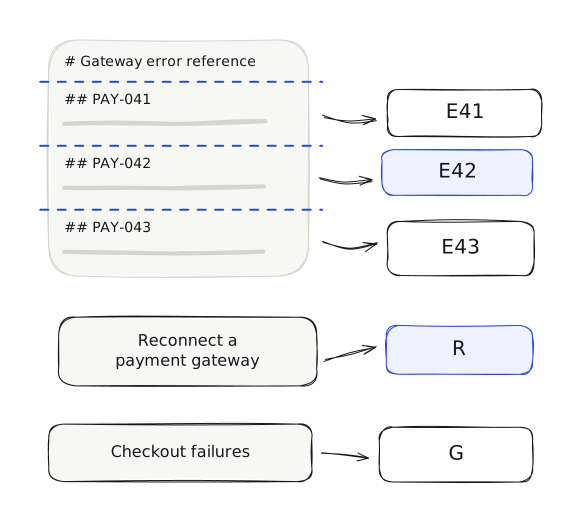
This produces:
| Chunk | Text kept together |
|---|---|
| E41 | The PAY-041 heading, timeout explanation and recommended response |
| E42 | The PAY-042 heading, rejected-credential explanation and rotated-key condition |
| E43 | The PAY-043 heading and disabled-currency explanation |
The document title, Gateway error reference, becomes source information shared by all three chunks. It does not become a separate chunk because it contains no error explanation on its own.
For E42, the searchable text includes the heading as well as the paragraph:
## PAY-042: Stored credential was rejected

Checkout returns PAY-042 when the provider rejects the credential saved for the active gateway connection. This can happen after the provider key has been rotated but the new value has not been saved in the product.
Keeping the heading in the searchable text matters. This allows the PAY-042 header to become part of the text search compares with the question, alongside the actual explanation.
Structure-based chunking works here because the document author has already separated the errors. We can use those boundaries instead of estimating new ones from token counts.
What if one section is too long?
A heading gives us a place to split the document, but the section beneath it may still be too long for one chunk. One error entry could contain many paragraphs, examples and repair steps.
In that case, we can split in stages:
- Split the source document into error sections.
- If an error section is too long, split it at paragraph boundaries.
- If a paragraph is still too long, split it at sentence boundaries.
- Use a token boundary only when the earlier boundaries cannot satisfy the limit.
This is called recursive splitting. Recursive means that an oversized piece is passed through the next, more detailed splitting rule. Pieces that already fit are left alone.
For example:
Source document
└── PAY-042 section
    ├── Explanation paragraph
    ├── Causes paragraph
    └── Repair procedure
If the whole PAY-042 section is too large, the three parts can become separate chunks. Each one should retain the PAY-042 heading and its source information so that the connection to the error is not lost.
Recursive splitting is not semantic chunking. It tries separators in a chosen order: sections, paragraphs, sentences, spaces and, if needed, individual characters. If a piece is still too large after one split, it tries the next separator on that piece. These separators make it less likely to cut through a paragraph or sentence, but the splitter does not compare the meaning of neighbouring text when deciding what should stay together.
Semantic chunking
What if the source document has no reliable headings?
We can try to detect changes in subject from the text itself. There are several ways to do this, so semantic chunking does not refer to one standard algorithm. One implementation works like this:
- Split the source document into sentences based on a threshold.
- Combine each sentence with some of its neighbouring sentences.
- Create an embedding for each combined window.
- Compare every window with the one after it.
- Start a new chunk when the difference crosses a chosen threshold.
A threshold is the value we choose as the cutoff for making a split.
Suppose our headings were missing and the error reference contained these five sentences:
| Sentence | Subject |
|---|---|
| S1 | The provider request timed out |
| S2 | Check the provider status and retry policy |
| S3 | The stored credential was rejected |
| S4 | The provider key may have been rotated without being saved |
| S5 | The checkout currency is not enabled |
We create embeddings for the sentence windows and compare neighbouring windows. Suppose we get these distances:
| Comparison | Illustrative distance |
|---|---|
| S1 to S2 | 0.08 |
| S2 to S3 | 0.43 |
| S3 to S4 | 0.06 |
| S4 to S5 | 0.47 |
These numbers are made up to show the calculation. They are not results from an embedding model.
If we choose a threshold of 0.35, the chunker makes a cut wherever the distance is greater than 0.35:
S1 + S2 | S3 + S4 | S5
That gives us one chunk for the timeout, one for the rejected credential and one for the disabled currency.
But the result depends on several decisions:
- which embedding model we use;
- how we detect sentences;
- how many neighbouring sentences we include;
- how we calculate the threshold;
- and whether we also enforce a maximum chunk size.
A lower threshold creates more cuts. A higher threshold combines more of the source document. Including neighbouring sentences can help the comparison understand local context, but it can also make two sides of a real subject change look more similar.
A large distance means the neighbouring sentence windows have different embeddings. That may indicate a change in subject, but it cannot confirm that the author intended a section break there.
Semantic chunking is useful when subject changes matter and the source document does not mark them reliably. It also adds work while processing the source document because the application must embed and compare the sentence windows before it can create the final chunks. For our error reference, it would add machinery to reconstruct boundaries that the ## headings already provide.
Searching a small chunk and returning a larger section
So far, we have assumed that the text used for search is also the text returned after a match. Those can be separate decisions.
Suppose the reconnection document grows and the author separates the procedure into several sections:
# Reconnect a payment gateway

## Before you begin
Only a workspace admin can change the gateway credential.

## Replace the credential
Open Settings > Payments > Gateways and replace the stored credential.

## Verify the repair
Choose Verify connection and confirm that a test request succeeds.

## Warnings
Do not disable the gateway before replacing the credential.
If we split at each heading, a question about replacing a gateway key might return the “Replace the credential” chunk. It contains the steps, but the admin requirement and warning are in other chunks.
We could keep the entire procedure together, as we did with our original short document. For a much longer procedure, however, smaller chunks may make it easier to match a question to a specific part.
Another option is to search the smaller chunks but return the complete procedure.
For this other option, we store the complete procedure as a parent chunk. We then create smaller child chunks from its sections. Each child contains its own text and the ID of its parent:
| Child chunk | Text it contains | Parent ID |
|---|---|---|
| C1 | The workspace-admin requirement | P1 |
| C2 | The credential-replacement steps | P1 |
| C3 | The verification step | P1 |
| C4 | The warning about disabling the gateway | P1 |
Each child stores the ID of its parent. When search finds the child chunk that talks about replacing the credential, the application follows that ID and retrieves the complete reconnection procedure. This approach is commonly called parent-child retrieval. The parent can contain a larger section or, when small enough, the entire source document.
This lets the system use a small child chunk for matching and a larger parent section for the information sent to the model. But it also introduces more work and a few other details we need to account for:
- Both parent and child records must be stored.
- Their IDs must remain connected when a source document changes.
- Several matching children may point to the same parent and need to be combined.
- A parent that is too large can bring back the unrelated text we were trying to avoid. Larger parents also mean fewer results may fit into the model’s request.
For our current source documents, this would be unnecessary. The PAY-042 entry and reconnection procedure are already short enough to search and return as complete chunks. Parent and child chunks become useful when a section is too broad for accurate matching, but its surrounding instructions still need to reach the model.
The approach we will use
For our payment documentation, we will use the structure already present in the source documents:
- Split the error reference at each
##heading, producing E41, E42 and E43. - Keep the short reconnection document together as R.
- Keep the short general checkout document together as G.
- If one of these sections grows too large, split inside it using paragraphs, sentences and finally token windows.
- Keep the source-document title and heading path with every chunk.
- Do not add overlap unless a fallback split creates a boundary that needs it.
That gives us five chunks:
| Chunk | Searchable content |
|---|---|
| E41 | PAY-041 and its timeout explanation |
| E42 | PAY-042, its rejected-credential explanation and the rotated-key condition |
| E43 | PAY-043 and its disabled-currency explanation |
| R | The complete gateway-reconnection procedure |
| G | The general checkout-failures explanation |
We store each chunk with information identifying where it came from. For E42, the record looks like this:
Chunk ID: E42
Source document: Gateway error reference
Heading: PAY-042: Stored credential was rejected
Text: Checkout returns PAY-042 when the provider rejects the credential saved for the active gateway connection. This can happen after the provider key has been rotated but the new value has not been saved in the product.
Error code: PAY-042
Source section: PAY-042: Stored credential was rejected
The heading and text give search something to compare with the question. The error-code field preserves the exact identifier for the lexical search we will add later. The source document and section tell us which help page the chunk came from, so we can replace it when that help page changes and link the result back to it.
We now know exactly what search can return. The next decision is how it should find these chunks.
Finding the repair when the words differ
Our engineer asks:
Checkout started showing PAY-042 after I changed the gateway key. How do I get payments working again?
The reconnection instructions use different wording:
If a provider API key is rotated, a workspace admin must open Settings > Payments > Gateways, select the active gateway, replace the stored credential, and choose Verify connection.
The engineer says they “changed the gateway key.” The document describes a provider key being “rotated.”
The wording is different, but the meaning is close. “Changed” corresponds to “rotated,” and “get payments working again” corresponds to reconnecting and verifying the gateway.
In Part 1, we used embeddings to compare a question with stored chunks. We will use the same approach here, creating an embedding from each chunk’s heading and text.
For chunk R, we store a record shaped like this:
Chunk ID: R
Heading: Reconnect a payment gateway
Text: If a provider API key is rotated, a workspace admin must open Settings > Payments > Gateways, select the active gateway, replace the stored credential, and choose Verify connection. Do not disable the gateway first; disabling it stops new checkouts while the connection is being repaired.
Source document: Reconnect a payment gateway
Embedding: [0.018, -0.271, 0.094, ...]
The embedding numbers here are made up and shortened for display. We keep the original text alongside the embedding so that, after finding R, we can return its instructions.
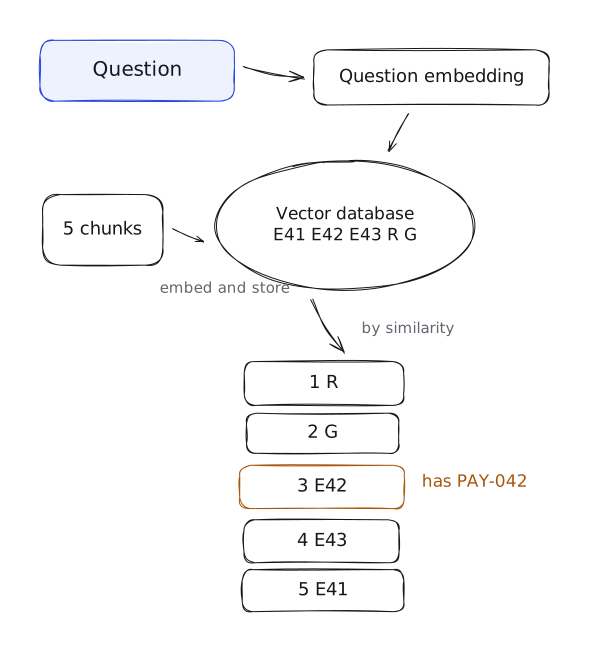
When the engineer asks the question, we pass the question through the same embedding model. We then compare the question embedding with the five stored chunk embeddings and order the chunks by similarity. Searching chunks this way is called semantic search. This form of search is also called dense retrieval. “Dense” describes embeddings with mostly nonzero values.
Suppose our dense search returns this order:
| Rank | Chunk | What it contains |
|---|---|---|
| 1 | R | The gateway reconnection steps |
| 2 | G | General checkout-failure advice |
| 3 | E42 | The PAY-042 explanation |
| 4 | E43 | A different gateway error |
| 5 | E41 | A provider timeout |
This is an illustrative ranking, not the output of a model we have run.
R gives us the repair instructions. G discusses checkout failures too, but it only tells the engineer to record the error code before changing the configuration. It does not explain PAY-042 or how to replace the credential.
E42 contains the exact error explanation, yet it ranks third.
The first result is useful: dense retrieval connected the engineer's wording with the reconnection instructions. But G also ranks highly because it discusses checkout failures and credentials. Similar text is not necessarily sufficient text.
E42 is only third even though it contains the exact error code. That code has a precise meaning in our product, but an embedding model is not an error-code lookup table. We need another way to make the exact identifier count.
Making the exact error code count
For this question, PAY-042 is more useful than the general word checkout. We want search to treat the complete code as one exact value.
Traditional text search begins by turning text into searchable terms. The rules that split and normalise the text are called an analyser. A general-purpose analyser may lowercase the text and split punctuation, turning PAY-042 into two terms:
pay, 042
The code no longer appears as one searchable term, so an exact lookup should not rely on this general text field. To preserve it, we add a separate error_code field to the chunk record:
Chunk ID: E42
Text: Checkout returns PAY-042 when the provider rejects the credential ...
Error code: PAY-042
When a question contains the product's known error-code format, the application searches that field for the complete value. The normal text remains searchable too.
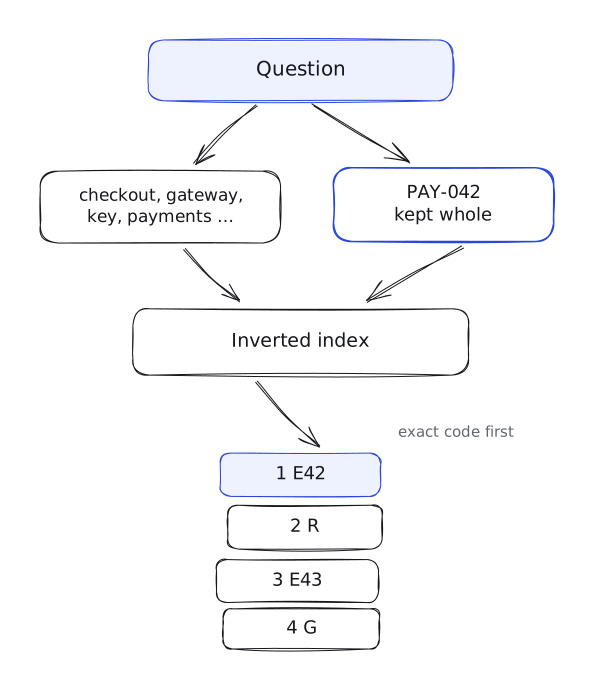
Under the hood, the search engine builds an inverted index. Instead of starting with each chunk and listing its terms, the index starts with each term and points to the chunks that contain it:
checkout   -> E42, E43, G
credential -> E42, R, G
rotated    -> E42, R
PAY-042    -> E42        (exact error_code field)
Searching for words and exact terms this way is called lexical search.
If several chunks contain the query terms, we still need to rank them. A common ranking method is BM25. Its full formula is not usually useful in an interview, but the reasoning behind it is:
-
How common the term is across the collection. In our example, key appears in two chunks, while gateway appears in four. A term found in fewer chunks generally contributes more to the score. This is called inverse document frequency.
-
How often the term appears within a chunk. Repeated occurrences can increase its score, but each additional occurrence contributes less. Mentioning gateway ten times should not make a chunk ten times as useful. This is called term-frequency saturation.
-
How long the chunk is. A long chunk has more opportunities to contain a query term. BM25 adjusts term frequency using the chunk’s length relative to the collection’s average. This is called length normalisation.
The search engine combines the contributions from the matching query terms to calculate each chunk’s score.
For our application, we will put exact error-code matches first, followed by the other chunks ordered by BM25. That is a rule we are choosing for this example; BM25 does not automatically require exact-code matches to come first.
We will use this illustrative lexical ranking:
| Rank | Chunk | Matches from the question |
|---|---|---|
| 1 | E42 | Exact PAY-042 value |
| 2 | R | Words including gateway, key and payments |
| 3 | E43 | Words including checkout and gateway |
| 4 | G | Words including checkout and gateway |
This ranking is also illustrative. It shows the behaviour we care about: dense retrieval is useful for the paraphrased repair request, while lexical retrieval gives the product-specific error code the weight it deserves.
Combining both searches
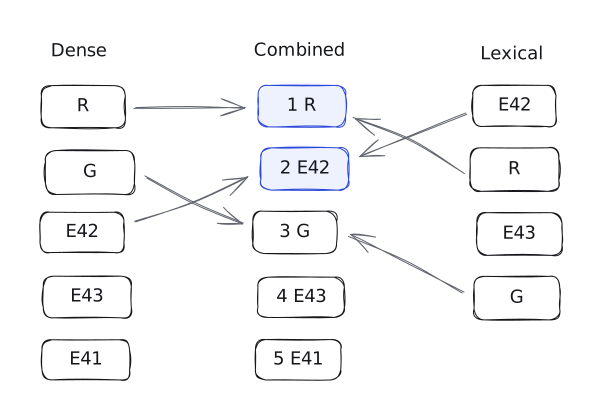
We now have two useful rankings:
| Dense search | Lexical search |
|---|---|
| 1. R | 1. E42 |
| 2. G | 2. R |
| 3. E42 | 3. E43 |
| 4. E43 | 4. G |
| 5. E41 |
Dense search found the repair instructions. Lexical search found the exact error explanation. Running them together is called hybrid search.
The remaining problem is how to turn two lists into one. We cannot safely add their raw scores. Vector similarity and BM25 use different calculations, so a vector score of 0.82 does not have the same meaning as a BM25 score of 8.2.
One simple option is reciprocal rank fusion, or RRF. Instead of comparing the raw scores, RRF assigns points to a chunk based on its position in each list.
Contribution from one list = 1 / (constant + rank)
Combined score = sum of the chunk’s contributions
Ranks start at 1. We will use 60 for the constant, a common choice. First place therefore contributes 1 / 61, second place contributes 1 / 62, and so on. A chunk absent from a list receives no contribution from it.
For our leading chunks:
R: Dense rank 1 + lexical rank 2 1 / 61 + 1 / 62 = 0.032522...
E42: Dense rank 3 + lexical rank 1 1 / 63 + 1 / 61 = 0.032266...
G: Dense rank 2 + lexical rank 4 1 / 62 + 1 / 64 = 0.031754...
We use the chunk ID to combine appearances of the same chunk, then sort by the combined score:
| Combined rank | Chunk | RRF score |
|---|---|---|
| 1 | R | 0.032522 |
| 2 | E42 | 0.032266 |
| 3 | G | 0.031754 |
| 4 | E43 | 0.031498 |
| 5 | E41 | 0.015385 |
R and E42 now occupy the first two positions. Both appear near the top of the input lists, while G receives a smaller contribution from lexical search.
RRF avoids comparing incompatible scores, but it also discards information from those scores. It treats first and second place the same way whether their original scores were almost equal or far apart. Its output tells us how to order the combined results, not how certain we should be that a chunk answers the question.
Comparing the shortlist more carefully
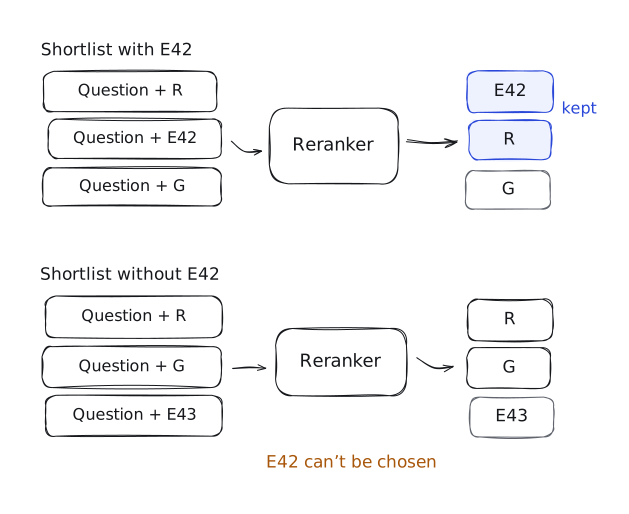
Hybrid search has given us three leading chunks: R, E42, and G. The general checkout chunk is related to the question, but it still does not contain the cause or repair. Can we make a closer comparison before selecting the final chunks?
This is the job of a reranker. A reranker receives the question and one possible chunk together:
Question + R
Question + E42
Question + G
A common reranker type is a cross-encoder. It processes the question and a chunk together, then produces a relevance score for that pair. For G, its input would contain:
Question: Checkout started showing PAY-042 after I changed the gateway key. How do I get payments working again?
Chunk:
Checkout failures
Checkout can fail because a gateway is unavailable, a credential is rejected, or a currency is disabled. Record the error code before changing the payment configuration.
We also create a pair for E42 and another for R. Each pair contains the same question and the complete text of that chunk.
This differs from our embedding search. We created the chunk embeddings before the question arrived, then compared them with the question embedding. The cross-encoder processes the two texts together, allowing its score to depend on their specific combination.
After scoring the three pairs, we sort the chunks again. An illustrative result might be:
| New rank | Chunk | Information it provides |
|---|---|---|
| 1 | E42 | Why key rotation can cause PAY-042 |
| 2 | R | How to replace the stored credential and verify the connection |
| 3 | G | General advice about checkout failures |
For this question, we would keep E42 and R. One explains the failure/cause, while the other explains the repair.
The embedding search handled these texts separately. Chunk embeddings were created before the question arrived, then compared with the question embedding. A common reranker called a cross-encoder reads each question-chunk pair together. That lets it examine how the words in the question relate to the words in that specific chunk.
For our question, the application should retain both E42 and R. One explains the cause and the other explains the repair. The goal is not always to find one winning chunk.
A reranker cannot use a chunk that the first search missed. If the shortlist contains R, G, and E43 but not E42, the reranker has no way to select the PAY-042 explanation. This is why the first-stage search and the number of chunks it returns matter a lot.
Only search what the user can read
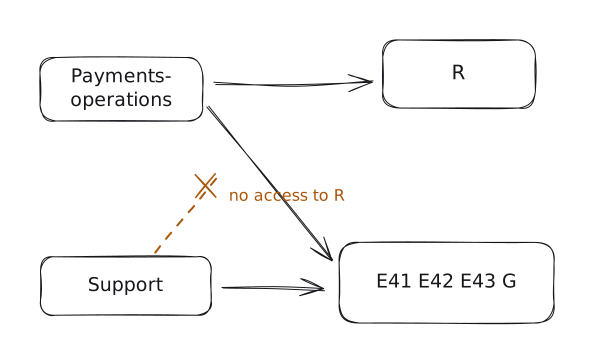
The rankings above assume our engineer belongs to the payments-operations team and can read all three source documents. A support agent can read the error reference and general checkout document, but not the internal reconnection procedure.
Those permissions must carry over to the chunks:
| Chunks | Groups allowed to read them |
|---|---|
| E41, E42, E43 | Support and payments-operations |
| R | Payments-operations |
| G | Support and payments-operations |
We store the permitted groups in each chunk’s record:
E42.allowed_groups = ["support", "payments-ops"]
R.allowed_groups   = ["payments-ops"]
G.allowed_groups   = ["support", "payments-ops"]
These fields are metadata: structured information stored alongside the chunk’s text, such as its source document ID or permitted groups.
Before either search runs, the server identifies the signed-in user and obtains their current groups from the trusted permission system. It then restricts search to chunks that allow at least one of those groups.
When filtering happens matters
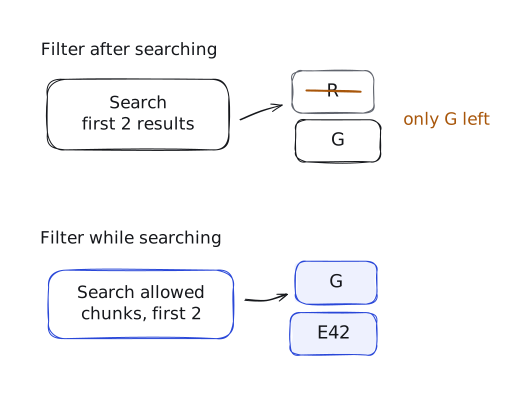
Consider a search that returns only its first two results. Without an access filter, our dense ranking starts with:
- R
- G
For a support agent, R is forbidden. If we retrieve these two results and remove R afterwards, only G remains. E42 was allowed, but it fell outside the two results we retrieved.
If the search considers permissions while finding matches, it can continue past R and return allowed chunks such as G and E42. This is the difference between prefiltering, which restricts the search to eligible records, and postfiltering, which removes ineligible records from an already limited result set. The exact behaviour depends on the search engine.
We apply the access restriction to both the vector and lexical searches, including the exact-code lookup.
The application must also enforce current permissions when fetching the selected text. Search metadata may be out of date after an access change. A restricted chunk must not be sent to the user, an external reranker or the answering model simply because an old search record still allowed it.
If we use parent-child retrieval, the same check applies to the parent text we fetch. Permission to retrieve a child cannot grant access to additional restricted material in its parent.
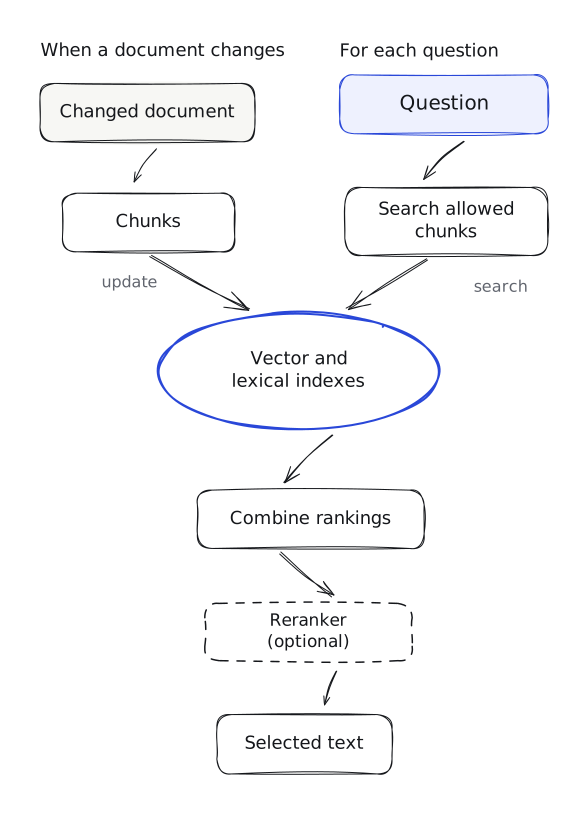
We now have two ways to search the same chunks, a method for combining their results and an optional reranker. Some of the additional work happens when documents change. The rest happens for every question.
Keeping the search records current
Suppose the author changes the PAY-042 explanation. Updating the source document does not change the text or embedding already stored for E42.
The application needs to:
- Read the updated document and create the affected chunks again.
- Replace their stored text.
- Update the searchable terms in the inverted index.
- Create new embeddings for chunks whose embedding input changed.
If the author removes a section, its old chunk must also be removed. If one section becomes two, we need to replace the old chunk with the new ones. The source document ID lets us identify which records belong to the changed document.
These updates should become searchable together. Otherwise, lexical search might use the new text while vector search still uses an embedding of the old explanation.
Changing the embedding model can require much more work. If the new model’s vectors are incompatible with the old ones, we must recreate the stored embeddings and switch question embedding to the new model too. We should not switch the question side first and compare its new vectors with the old collection.
Permission changes need their own updates. If a group loses access to a document, that change must reach its chunk records. The current permission check must block access while the search metadata catches up. Changing permissions alone does not require recreating embeddings when the searchable text stays the same.
Processing each question
For a hybrid search, each question requires:
- Creating the question embedding.
- Running the vector search and lexical search.
- Combining their rankings.
- Optionally reranking the leading chunks.
- Fetching the selected text, subject to current permissions.
The two searches can run in parallel. Reranking must wait for their results.
The shortlist size directly affects reranking work. A shortlist of 20 chunks creates 20 question-chunk pairs; a shortlist of 100 creates 100 pairs. They can be processed in batches, but the model still has more text to process.
Larger shortlists may include a useful chunk that ranked lower in the initial search. They also increase processing cost and can increase response time. We should choose the size based on the questions and collection, rather than assuming that returning more chunks is always better.
Searching a larger collection
With five chunks, we can compare the question embedding with every stored embedding. This is exact vector search: we calculate similarity against all eligible vectors and return the closest ones.
With millions of chunks, those comparisons can become expensive. An approximate vector index organizes vectors so that search can inspect a smaller set of promising candidates instead of comparing every vector.
That reduces search work, but it can miss a close match that an exhaustive comparison would have found. Index settings control some of this trade-off: spending more search effort can improve the chances of finding the closest chunks, at the cost of response time.
We do not need every option in every application. Exact-code lookup and lexical search may be enough for questions that closely follow the documents’ wording. Embedding search helps with paraphrased questions. Hybrid search is useful when both matter, as they do in our payment example. A reranker adds another comparison when the initial ordering needs improvement.
Conclusion
Retrieval begins with deciding what each chunk contains. If we separate an instruction from its conditions, search may return only part of the explanation. If we keep too much together, a result may include several unrelated subjects. The document’s structure and the questions we expect help us choose those boundaries.
Once the chunks are stored, we need to find them. Embeddings help match different wording, while lexical search uses the words and identifiers in the question. Hybrid search combines their results, and a reranker can compare the shortlisted chunks more closely before we select the text to send.
Those results must also reflect the current documents and the user’s permissions. A well-ranked chunk is still unsuitable if it contains an old instruction or information the user cannot read.
In an interview, explain these choices using the documents and questions in the problem. Show what each chunk contains, how the application finds it and why the selected chunks contain the information needed to answer.
In the next article, we’ll take those selected chunks and use them to build the model’s request. We’ll look at how to include the source material, handle missing information and produce an answer supported by the documents.
Was this article useful?
Test your understanding
Question 1 of 15
Single answer
Loading comments…